How To Change Your Account Details

Created by Haider Ali, Modified on Wed, 22 Oct at 6:46 AM by Haider Ali

Your Webfoundr.com Account is how you control your domains, servers and all of the services that we provide. It's also where you submit and view tickets as well as view and pay invoices.

In this guide, we'll show you how to change your account details.


STEP 1: Login to the Webfoundr Platform


STEP 2: You can either click on the arrow in the upper right, or simply click on the update  button under your address!
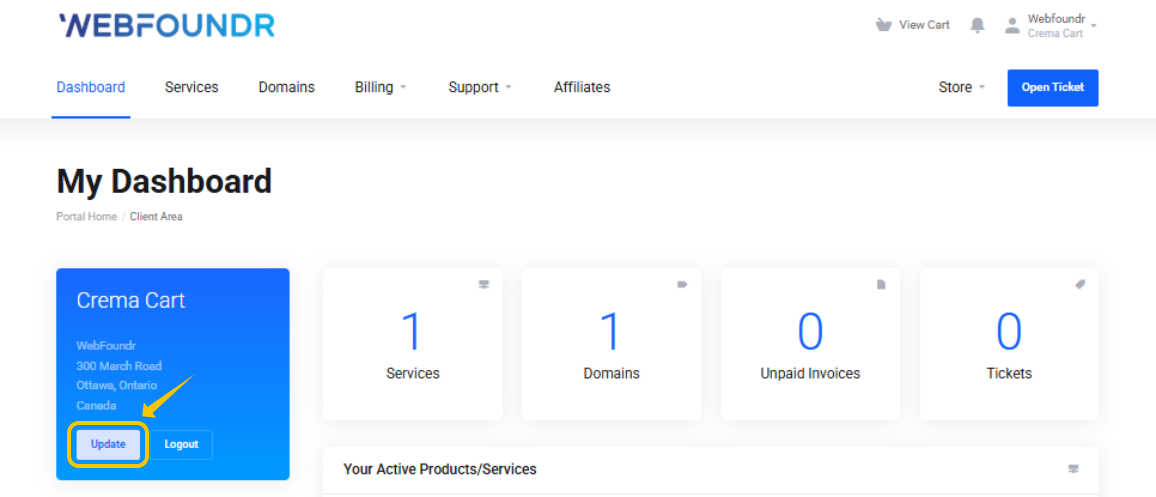


If you would like to change the Name or Email Address on the account or remove a credit card on file, please submit a support ticket with this request.


Was this article helpful?

That’s Great!

Thank you for your feedback

Sorry! We couldn't be helpful

Thank you for your feedback

Let us know how can we improve this article!

Select at least one of the reasons
CAPTCHA verification is required.

Feedback sent

We appreciate your effort and will try to fix the article