Recently I was working on a project where I used G-Suite for my primary domain but needed server-side email functionality for a script I was running. To accomplish this, I simply setup a couple of email addresses on a subdomain.
This is also the perfect solution for those of you wanting to install WHMCS on a subdomain (i.e. https://billing.yourdomain.com) so you can pipe support and sales request right into the WHMCS sales desk all while retaining your same email settings on your primary domain.
Setup As Subdomain In cPanel
For those of you using our Web Hosting, you have to setup the subdomain inside of cPanel.
If you’re just using the subdomain for email, this is a fine practice and it’s extremely easy as long as you’re using our local DNS.
If you’re using a third-party DNS provider such as Cloudflare, you’ll have to make sure you copy and add the proper DNS entries to the external DNS provider that you will see in the zone editor after you add the subdomain.
To setup, simply navigate to cPanel -> Domains

On the next page you will see a listing of all your domains. Click on "Create a New Domain"

On the next screen, enter in your new subdomain using a URL already added in your account. In this example, I'm using my domain to add test subdomain.
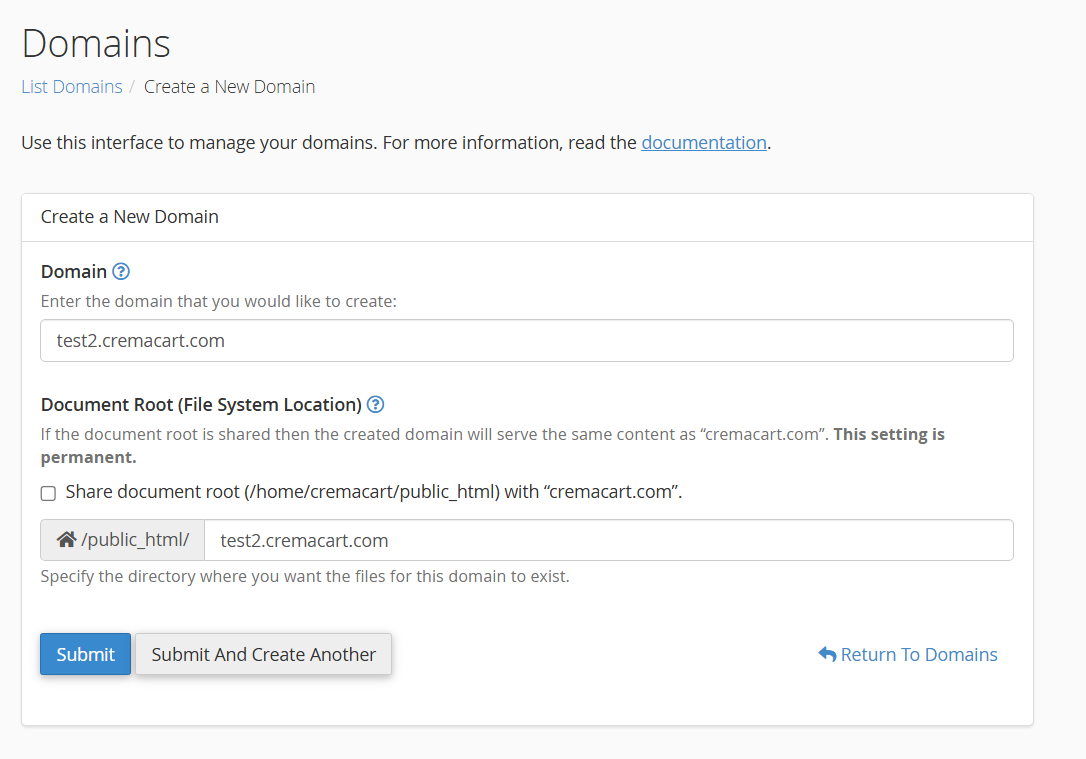
After you do that, the proper DNS entries will be created in the zone and the subdomain should begin working right away if you are using Webfoundr DNS. Otherwise, navigate to the the zone editor and copy the new dns records to your external dns provider.
Navigate over to cPanel -> Email Accounts to setup individual email addresses.

You will now see your new subdomain in the drop down. Simply select it, choose your username, generate a password and you now have an email address on a 'subdomain'!

You can now have 'local' mail delivered to this mailbox as well with very little spam activity on it. This is great for contact forms and WordPress notification emails via WP SMTP. By setting up your mail to deliver locally like this you can then use Gmail to 'pop' that email off the server instead of trying to get your forms to send directly to Gmail which can be hit and miss with regard to delivery! This is the way!